<?xml version="1.0" encoding="UTF-8"?><feed
	xmlns="http://www.w3.org/2005/Atom"
	xmlns:thr="http://purl.org/syndication/thread/1.0"
	xml:lang="en-US"
	>
	<title type="text">Kristiyan Katsarov</title>
	<subtitle type="text">Web Developer</subtitle>

	<updated>2022-04-27T04:04:12Z</updated>

	<link rel="alternate" type="text/html" href="https://katsarov.info" />
	<id>https://katsarov.info/feed/atom/</id>
	<link rel="self" type="application/atom+xml" href="https://katsarov.info/feed/atom/" />

	<generator uri="https://wordpress.org/" version="6.9.4">WordPress</generator>
<icon>https://katsarov.info/wp-content/uploads/2021/02/cropped-favicon-32x32.png</icon>
	<entry>
		<author>
			<name>Kristiyan Katsarov</name>
							<uri>https://katsarov.info</uri>
						</author>

		<title type="html"><![CDATA[3 Code Snippets That Will Boost Your WordPress Website]]></title>
		<link rel="alternate" type="text/html" href="https://katsarov.info/3-code-snippets-core-web-vitals/" />

		<id>https://katsarov.info/?p=1572</id>
		<updated>2022-04-27T04:04:12Z</updated>
		<published>2021-07-26T03:00:00Z</published>
		<category scheme="https://katsarov.info" term="Uncategorized" />
		<summary type="html"><![CDATA[I was optimizing a lot for core web vitals lately and saw some common mistakes a lot of themes and plugins do. I decided to share 3 code snippets which you can use in your theme or via plugin to improve the core web vitals score of your website. Delay Inline JavaScript This script should [&#8230;]]]></summary>

					<content type="html" xml:base="https://katsarov.info/3-code-snippets-core-web-vitals/"><![CDATA[
<p>I was optimizing a lot for core web vitals lately and saw some common mistakes a lot of themes and plugins do. I decided to share 3 code snippets which you can use in your theme or via plugin to improve the core web vitals score of your website.</p>


<h2 class="wp-block-heading">Delay Inline JavaScript</h2>


<p>This script should be used in a combination with any caching plugin. The functionality already exists in WP Rocket, so I adopted my script to W3 Total Cache. What this script basically does, is that it replaces the JavaScript contents in inline <code>&lt;script&gt;</code> tags so that the script is executed after the <code>DOMContentLoaded</code> Event.</p>


<pre class="wp-block-code language-php"><code>add_filter('w3tc_process_content', function( $content ) {
	preg_match_all( "/&lt;script(?:&#91;^&gt;]*)&gt;(?&lt;content&gt;&#91;\s\S]*?)&lt;\/script&gt;/ims", $content, $matches, PREG_SET_ORDER );
	
	foreach ( $matches as $code ) {
		if ( strpos( $code&#91;'content'], 'jQuery(' ) === false ) {
			continue;
		}
		if ( strpos( $code&#91;'content'], 'DOMContentLoaded' ) !== false ) {
			continue;
		}
		if ( empty( $code&#91;'content'] ) ) {
			continue;
		}
		if ( preg_match( '/(application\/ld\+json)/i', $code&#91;0] ) ) {
			continue;
		}

		$new_code = "&lt;script&gt;document.addEventListener('DOMContentLoaded', () =&gt; { " . $code&#91;'content'] . "});&lt;/script&gt;";
		$content = str_replace( $code&#91;0], $new_code, $content );
	}
	return $content;
}, PHP_INT_MAX);</code></pre>


<p>Often this is the part that turns the web vitals from yellow to green - optimizing the inline code, because a lot of plugins are just a mess! The code snippet is also available as a gist on GitHub - <a href="https://gist.github.com/katsar0v/dcc5e32f31a363343b4fd98122ff8d21" target="_blank" rel="noreferrer noopener">Delay Inline JavaScript With W3 Total Cache</a>.</p>


<h2 class="wp-block-heading">WebP Code Snippet - Finally!</h2>


<p>I haven't found a snippet, just a bunch of plugins with a lot of overhead that make a WebP copy of an image. Of course they all want to sell the pro version and at the end of the day, none of the free plugins (with small exceptions) does the job correctly. Here is a link to the gist -  <a href="https://gist.github.com/katsar0v/8c5e1b3ab1f28ea3c81c03efbeea7c59" target="_blank" data-type="URL" data-id="https://gist.github.com/katsar0v/8c5e1b3ab1f28ea3c81c03efbeea7c59" rel="noreferrer noopener">WebP Code Snippet</a>.</p>


<p>The job can be done with a simple snippet and web server adjustment, here is the code:</p>


<pre class="wp-block-code language-php"><code>function generate_webp_from_file($file, $compression_quality = 80)
{
    // check if file exists
    if (!file_exists($file)) {
        return false;
    }

    // If output file already exists return path
    $output_file = $file . '.webp';
    if (file_exists($output_file)) {
        return $output_file;
    }

    $file_type = strtolower(pathinfo($file, PATHINFO_EXTENSION));
	
    if (function_exists('imagewebp')) {
        switch ($file_type) {
            case 'jpeg':
            case 'jpg':
                $image = imagecreatefromjpeg($file);
                break;

            case 'png':
                $image = imagecreatefrompng($file);
                imagepalettetotruecolor($image);
                imagealphablending($image, true);
                imagesavealpha($image, true);
                break;

            case 'gif':
                $image = imagecreatefromgif($file);
                break;
            default:
                return false;
        }

        // Save the image
        $result = imagewebp($image, $output_file, $compression_quality);
        if (false === $result) {
            return false;
        }

        // Free up memory
        imagedestroy($image);

        return $output_file;
    } elseif (class_exists('Imagick')) {
		error_log( $file_type );
		if ($file_type !== 'png') {
			return false;	
		}
		
        $image = new Imagick();
        $image-&gt;readImage($file);

        if ($file_type === 'png') {
            $image-&gt;setImageFormat('webp');
            $image-&gt;setImageCompressionQuality($compression_quality);
            $image-&gt;setOption('webp:lossless', 'true');
        }

        $image-&gt;writeImage($output_file);
        return $output_file;
    }

    return false;
}

/**
 * Generate .webp copy from each size when an attachment is uploaded
 */
add_action( 'wp_generate_attachment_metadata', 'wpse_256351_upload', 10, 3 );
function wpse_256351_upload( $meta, $id, $content ) {
  	$upload_dir = wp_get_upload_dir()&#91;'basedir'] . '/';
	$file = $upload_dir . $meta&#91;'file'];
	generate_webp_from_file( $file );
	
	foreach( $meta&#91;'sizes'] as $key =&gt; $file ) {
		$path = wp_get_upload_dir()&#91;'path'] . '/' . $file&#91;'file'];
		generate_webp_from_file( $path );
	}
	return $meta;
}

/**
 * Delete the all .webp copies
 */
add_action( 'delete_attachment', function( $id, $post ) {
	$file = get_attached_file( $id );
	$original_webp = "$file.webp";
	if( file_exists( $original_webp ) ) {
		unlink( $original_webp );
	}
	
	$meta = wp_get_attachment_metadata( $id );
	foreach( $meta&#91;'sizes'] as $key =&gt; $file ) {
		$path = wp_get_upload_dir()&#91;'path'] . '/' . $file&#91;'file'];
		$webp_file = "$path.webp";
		if( file_exists( $webp_file ) ) {
			unlink( $webp_file );
		}
	}
}, 10, 2);</code></pre>


<p>What needs to be adjusted is your web server. Luckily for nginx and apache, I can provide two little snippets that work like a charm, so webp is served to every supported browser.</p>


<h3 class="wp-block-heading">Apache</h3>


<pre class="wp-block-code language-php"><code>AddType image/webp .webp

&lt;IfModule mod_rewrite.c&gt;
  RewriteEngine On

  RewriteCond %{HTTP_ACCEPT} image/webp
  RewriteCond %{REQUEST_FILENAME} -f
  RewriteCond %{REQUEST_FILENAME}.webp -f
  RewriteRule ^/?(.+?)\.(jpe?g|png)$ /$1.$2.webp &#91;NC,T=image/webp,E=EXISTING:1,E=ADDVARY:1,L]

  &lt;IfModule mod_headers.c&gt;
    &lt;FilesMatch "(?i)\.(jpe?g|png)$"&gt;
      Header append "Vary" "Accept"
    &lt;/FilesMatch&gt;
  &lt;/IfModule&gt;
&lt;/IfModule&gt;</code></pre>


<h3 class="wp-block-heading">NGINX</h3>


<pre class="wp-block-code language-php"><code>location ~* \.(png|jpe?g)$ {
	expires 365d;
	add_header Pragma "public";
	add_header Cache-Control "public";
	add_header Vary Accept;

	if ($http_accept !~* "webp") {
		break;
	}

	try_files $uri$webp_suffix $uri =404;
}</code></pre>


<h2 class="wp-block-heading">Optimize WooCommerce</h2>


<p>WooCommerce is a great plugin. Unfortunately they load all types of libraries and css codes, that it basically loads a bunch of unused code (e.g. on the homepage) which only slows down the HTTP requests to your website.</p>


<p>I created a code snippet (still work in progress though) that removes all the unnecessary WooCommerce scripts and styles if they are loaded on a non-woocommerce page. Gist: <a href="https://gist.github.com/katsar0v/1e2b63265f2fd77dff1c13c7f7366c1f" target="_blank" data-type="URL" data-id="https://gist.github.com/katsar0v/1e2b63265f2fd77dff1c13c7f7366c1f" rel="noreferrer noopener">Optimize WooCommerce For Web Vitals</a></p>


<pre class="wp-block-code language-php"><code>/**
 * Disable WooCommerce block styles (front-end).
 */
function slug_disable_woocommerce_block_styles() {
	if( function_exists( 'is_woocommerce') ) {
		if( !is_woocommerce() &amp;&amp; !is_cart() &amp;&amp; !is_checkout() ) {
			wp_dequeue_style( 'wc-block-style' );	
			wp_dequeue_style( 'wp-block-library' );
			wp_dequeue_style( 'woocommerce-layout' );
			wp_dequeue_style( 'woocommerce-smallscreen' );
			wp_dequeue_style( 'woocommerce-general' );
			wp_dequeue_style( 'photoswipe' );
			wp_dequeue_style( 'photoswipe-default-skin' );
			wp_dequeue_script( 'wc-add-to-cart' );
			wp_dequeue_script( 'photoswipe' );
			wp_dequeue_script( 'photoswipe-ui-default' );
			wp_dequeue_script( 'wc-cart-fragments' );
		}
	}
}
add_action( 'wp_enqueue_scripts', 'slug_disable_woocommerce_block_styles', PHP_INT_MAX );

add_filter( 'woocommerce_enqueue_styles', function($arr) {
	if( function_exists( 'is_woocommerce') ) {
		if( !is_woocommerce() &amp;&amp; !is_cart() &amp;&amp; !is_checkout() ) {
			return &#91;];
		}
	}
	return $arr;
} );

/**
 * Remove lightbox
 */
add_action( 'wp', function() {
   remove_theme_support( 'wc-product-gallery-lightbox' ); // removes photoswipe markup on frontend	
}, PHP_INT_MAX );</code></pre>


<p>Beware that this script removes all WooCommerce libraries on non-woocommerce pages (e.g. shop or single product) - if you need the libraries on a specific page, you need to adjust the snippet to your needs.</p>


<p>That's it, I hope you like the scripts and give feedback in the gist of each one - if you need professional help with core web vitals <a href="https://katsarov.info/get-in-touch/" data-type="page" data-id="26">get in touch</a> with me 🙂</p>
]]></content>
		
			</entry>
		<entry>
		<author>
			<name>Kristiyan Katsarov</name>
							<uri>https://katsarov.info</uri>
						</author>

		<title type="html"><![CDATA[Top 5 Free Plugins for WooCommerce]]></title>
		<link rel="alternate" type="text/html" href="https://katsarov.info/top-5-free-plugins-for-woocommerce/" />

		<id>https://katsarov.info/?p=1550</id>
		<updated>2021-07-23T09:13:00Z</updated>
		<published>2021-07-25T07:00:00Z</published>
		<category scheme="https://katsarov.info" term="Uncategorized" />
		<summary type="html"><![CDATA[If you own an eCommerce website, or if you’re currently planning to build an online store, chances are you have heard of WooCommerce - that is if you are not using this popular platform already. With almost 4 million sites using its features, the WooCommerce platform is among the most used and has the most [&#8230;]]]></summary>

					<content type="html" xml:base="https://katsarov.info/top-5-free-plugins-for-woocommerce/"><![CDATA[
<p>If you own an eCommerce website, or if you’re currently planning to build an online store, chances are you have heard of WooCommerce - that is if you are not using this popular platform already. With almost 4 million sites using its features, the WooCommerce platform is among the most used and has the most powerful plugins currently available.</p>


<p>While this popular &amp; convenient eCommerce platform has a wide range of options that allow anyone to create a fully functional online store on their site, it still leaves plenty of room for extension. So, if you already have a WooCommerce-friendly online store theme installed on your site, but want to further customize your store to fit your own needs to the fullest, you can do all this &amp; more using one of the many available best free WooCommerce plugins.</p>


<p>For this reason, today we’ve gathered a list of the 5 best plugins in the WooCommerce category that can be found on the web. Aside from being free - just like WooCommerce itself - all of the below-mentioned plugins can also be integrated into the WooCommerce platform with great ease.</p>


<h2 class="wp-block-heading">Stripe Payment Gateway</h2>


<figure class="wp-block-image size-large"><img decoding="async" src="https://ps.w.org/woocommerce-gateway-stripe/assets/banner-772x250.png" alt="banner"><figcaption>Source: https://wordpress.org/plugins/woocommerce-gateway-stripe/</figcaption></figure>


<p>In the past, the WooCommerce platform supported only one payment method out of the box: PayPal Standard. However, this payment gateway was hardly desirable for most serious online store owners, as customers were diverted to the external PayPal site to make their payments.</p>


<p>As such, most online eCommerce stores install a reliable payment gateway that facilitates card payments onsite - typically, PayPal Pro or Stripe.</p>


<p>If you go for Stripe, then congrats! Because the official WooCommerce Stripe Payment Gateway is now available completely free of charge.</p>


<p>You can now easily install the Stripe gateway during the WooCommerce plugin installation wizard at the click of a single button. After syncing your online store with the Stripe API, you will be able to accept Visa, Mastercard &amp; a whole host of others.</p>


<h2 class="wp-block-heading">YITH WooCommerce Wishlist</h2>


<figure class="wp-block-image size-large"><img decoding="async" src="https://ps.w.org/yith-woocommerce-wishlist/assets/banner-772x250.jpg" alt="banner"><figcaption>Source: https://wordpress.org/plugins/yith-woocommerce-wishlist/</figcaption></figure>


<p>YITH WooCommerce Wishlist is a handy free plugin that will allow your site users to save the products they are interested in or want to buy in the future so they can find them more easily later and make their desired purchase.</p>


<p>Your site users will also be able to share their wishlist with their friends &amp; loved ones for special occasions such as birthdays and holidays and put it up on their social media profiles. All this can effectively contribute to the product advertisement of your store and also help you draw in new customers.</p>


<h2 class="wp-block-heading">Checkout Field Editor (Checkout Manager) for WooCommerce</h2>


<figure class="wp-block-image size-large"><img decoding="async" src="https://ps.w.org/woo-checkout-field-editor-pro/assets/banner-772x250.png" alt="banner"><figcaption>Source: https://wordpress.org/plugins/woo-checkout-field-editor-pro/</figcaption></figure>


<p>With the help of this free WooCommerce plugin, you can easily add more fields to your website checkout page. Depending on your website customers’ preferences, you can change the look of your checkout page. You can also add, delete or rearrange the site’s checkout fields as per your requirement using this free plugin.</p>


<p>The plugin gives you an option to include Select any Text fields in your checkout area. You can easily edit the core WooCommerce checkout fields and also the custom fields that you create. This WooCommerce plugin also offers an option to selectively display the desire checkout fields on the order admin page as well as emails.</p>


<h2 class="wp-block-heading">Product Slider for WooCommerce</h2>


<figure class="wp-block-image size-large"><img decoding="async" src="https://ps.w.org/woo-product-slider/assets/banner-772x250.png" alt="banner"><figcaption>Source: https://wordpress.org/plugins/woo-product-slider/</figcaption></figure>


<p>If you want to present your site’s products in a dynamic and user-friendly way, Products Slider for WooCommerce is perfect for the job. This easy-to-use WooCommerce plugin will allow you to make beautiful &amp; practical product sliders &amp; then you’ll be able to display them anywhere on your online store using a shortcode.</p>


<p>You can effectively customize your sliders &amp; even add your custom CSS to further style it according to your selected preferences. Additionally, you will be able to manage the speed of your slides, choose whether you want to display or hide slider navigations &amp; dots, set the slider to rewind and loop, &amp; so on.</p>


<h2 class="wp-block-heading">WooCommerce Multilingual</h2>


<figure class="wp-block-image size-large"><img decoding="async" src="https://ps.w.org/woocommerce-multilingual/assets/banner-772x250.png" alt="banner"><figcaption>Source: https://wordpress.org/plugins/woocommerce-multilingual/</figcaption></figure>


<p>The main purpose of using the WooCommerce Multilingual plugin is to enable the popular multilingual support on WooCommerce-powered sites. Its main features include the ability to translate all WooCommerce store products, the easy translation for product categories, products, &amp; attributes, running a single WooCommerce online store with multiple currencies based on your location or a customer’s language, &amp; different payment gateways according to the user’s location.</p>


<h2 class="wp-block-heading">Final Thoughts</h2>


<p>Each one of the above-mentioned free WooCommerce plugins contains rather useful and practical features that will help give your online WooCommerce store a fresher look, a broader range of capabilities, &amp; personalize it in a way that best suits your newly created business.</p>


<p>You can find all kinds of plugins in our list - from those that offer the creation of product sliders and those which offer you an effective payment gateway. So, we urge you to check all the WooCommerce plugins carefully so as not to miss any opportunities to improve the functionality &amp; efficiency of your online eCommerce business in the best possible way.</p>
]]></content>
		
			</entry>
		<entry>
		<author>
			<name>Kristiyan Katsarov</name>
							<uri>https://katsarov.info</uri>
						</author>

		<title type="html"><![CDATA[The Importance Of A Website For Your Business Success]]></title>
		<link rel="alternate" type="text/html" href="https://katsarov.info/the-importance-of-a-website-for-your-business-success/" />

		<id>https://katsarov.info/?p=1516</id>
		<updated>2021-07-20T05:53:48Z</updated>
		<published>2021-07-24T04:30:00Z</published>
		<category scheme="https://katsarov.info" term="Uncategorized" />
		<summary type="html"><![CDATA[We have the world at our fingertips and all the information at our fingertips, as they say. There is no doubt in my mind about that. Online worlds are lovely. As a result, we are connecting more with each other, sharing information, and living better. Internet usage is prevalent among most people. One might use [&#8230;]]]></summary>

					<content type="html" xml:base="https://katsarov.info/the-importance-of-a-website-for-your-business-success/"><![CDATA[
<p>We have the world at our fingertips and all the information at our fingertips, as they say. There is no doubt in my mind about that. Online worlds are lovely. As a result, we are connecting more with each other, sharing information, and living better.</p>


<p>Internet usage is prevalent among most people. One might use the Internet to buy a product, get a service, read a blog, entertain themselves, or for many other reasons.</p>


<p>Because the average person spends hours on the Internet every day, businesses have no choice but to move online. A business website and social media presence are becoming essential for companies of all sizes. You could be losing many potential customers if you don't have a website for your business. You can grow your business many folds by understanding the importance of a website.</p>


<p><strong>These are the reasons why it is vital to have a website:</strong></p>


<h2 class="wp-block-heading">24/7 Online Presence</h2>


<p>Anybody, anywhere, can access your website at any time. This is one of the significant advantages of having a website. It is essential to have a website even if you are not in your business hours since customers can access it during off-hours, which is one of the main factors in the importance of a website. The website is constantly in action to ensure that customers can always get the assistance they need at their convenience.</p>


<h2 class="wp-block-heading">24/7 Customer Support</h2>


<p>Any business that provides customer support has a tough job. It is, however, easier and more cost-effective to provide customer support online than to hire personnel. It is at this point that having a website becomes critical, as it can be used to provide a variety of ways to provide customer support:</p>


<p>A frequently used medium is FAQs. Our website answers all frequent customer questions, saving you time and resources while providing customers with precise and relevant information at the same time.</p>


<p>Chatbots - Chatbots on websites also answer frequent customer questions based on responses provided by templates. In addition to providing users with information about signing up procedures, services/products, etc., chatbots can also help users with different forms of communication.</p>


<h2 class="wp-block-heading">Information Exchange</h2>


<p>Today, most customers expect that brands and businesses have an online presence through which they can access their services. An appealing aspect of a website is how easy it makes it for customers to find information. A website is nothing more than a method of communicating with customers and a tool for providing information and resources to them. Websites can facilitate the exchange of information in several ways, including:</p>


<ul class="wp-block-list"><li>Customers are informed about new product and service offers through advertisements</li><li>Newsletters that provide updates on upcoming events and new products</li><li>Forms that customers can use to inquire or request information</li></ul>


<h2 class="wp-block-heading">Establish Credibility and Build Trust</h2>


<p>Customers nowadays expect that businesses have a website or online presence, just like they used to expect companies to have contact information in brochures back in the day. Establishing trust begins with this step.&nbsp;</p>


<p>An online presence is therefore crucial to the success of any business. In addition to that, if a company's website is excellent in its navigation and features, customers will be more inclined to trust the company.</p>


<p>Credibility and trust are built through websites, which are crucial tools for business growth. In addition, local SEO services can further boost businesses that are brand new to the market by attracting local demographics.</p>


<h2 class="wp-block-heading">Professional Web Design</h2>


<p>There is no reason for website visitors to stay on any Web page unless they are tempted. When visiting any website, visitors can quickly get bored and expect something unique to attract their attention. Business websites should be designed and built to provide exceptional features and easy navigation to customers. Having this information on your website will encourage visitors to visit it and hopefully make a purchase.</p>


<h2 class="wp-block-heading">Sales&nbsp;</h2>


<p>You can access your website from any corner of the globe, increasing the accessibility of your business. A website facilitates business communication and allows them to increase sales by breaking down geographical barriers.</p>


<h2 class="wp-block-heading">Revenue</h2>


<p>Websites are capable of generating income indefinitely. You can reach a high level of revenue if your site can cross borders. Make sure that people can find you on your site when searching for you and optimize your site.</p>


<p>You run a website about reviewing or selling mobile phones. You can display relevant ads for these phones in some of your digital space on your website. Besides that, you can also display ads on your website if you have enough space. Adding this to your revenue generation strategy is just another way to increase income.</p>


<h2 class="wp-block-heading">Cost-Effective</h2>


<p>It is costly to purchase or rent commercial space for a physical store. The costs associated with your employees, your company's interior, and your furniture are also significant. In contrast, a website can easily be created and is very affordable.</p>


<p>WordPress, Shopify, and Wix are CMS platforms that allow anyone to create a website with minimal assistance. Experts may be needed only when your website has a large number of pages, is e-commerce-driven, or has complex filters. Although, the cost is still considerably lower than putting together a physical store.</p>
]]></content>
		
			</entry>
		<entry>
		<author>
			<name>Kristiyan Katsarov</name>
							<uri>https://katsarov.info</uri>
						</author>

		<title type="html"><![CDATA[5 Reasons To Hire A WordPress Developer]]></title>
		<link rel="alternate" type="text/html" href="https://katsarov.info/5-reasons-to-hire-a-wordpress-developer/" />

		<id>https://katsarov.info/?p=1538</id>
		<updated>2021-07-22T08:02:26Z</updated>
		<published>2021-07-21T15:43:14Z</published>
		<category scheme="https://katsarov.info" term="Uncategorized" />
		<summary type="html"><![CDATA[If you own a business, chances are building a website has already crossed your mind and in terms of website building, one of the easiest ways to do it as an amateur is using WordPress. The reason is, it is one of the most well-known and simplest content management systems (CMS) that will take care [&#8230;]]]></summary>

					<content type="html" xml:base="https://katsarov.info/5-reasons-to-hire-a-wordpress-developer/"><![CDATA[
<p>If you own a business, chances are building a website has already crossed your mind and in terms of website building, one of the easiest ways to do it as an amateur is using WordPress.</p>


<p>The reason is, it is one of the most well-known and simplest content management systems (CMS) that will take care of all the hard work like coding and organizing on behalf of you while you’re providing the content.</p>


<p>But, why hire a WordPress developer?</p>


<p>Because if you’re new to this venture, your website will have many shortcomings which will cost you a fortune.</p>


<p>But, this is just the tip of the iceberg, and here are 5 good reasons that’ll convince you to hire a WordPress developer who’ll make you a top-notch website with zero limitations.</p>


<h2 class="wp-block-heading">They make custom, unique and creative websites</h2>


<p>Unless you want to stick with a cookie-cutter website that'll blend in with every other, hiring a WordPress developer is the way to go. In fact, WordPress developers can create your website incorporating your business' needs and branding by going beyond pre-made themes.</p>


<p>Moreover, WordPress is popular for its thousands of plugins. However, going overboard with plugins without proper knowledge can ruin your website's performance.</p>


<p>But, if you hire a WordPress developer they will sort through the best plugins, create custom themes and span out the functionality of the plugins, ultimately offering you a one-of-a-kind website.</p>


<h2 class="wp-block-heading">They know how to do performance optimization</h2>


<p>Nowadays, users are after simplicity, and Google favours user-friendly sites that have higher search rankings. They mainly measure the dwelling time or the overall time users spend on your site. The more time they spend on your website, Google assumes that you’re offering them pre-eminent content.</p>


<p>That said, although WordPress is easy to use, WordPress developers have more experience in building websites, and they can take the user experience and performance to great heights while fixing errors and bugs.</p>


<p>Not to mention, experts have extensive knowledge to develop responsive websites to work on mobile or any device flawlessly and make them compatible with any browser such as Chrome, Firefox, and Safari.</p>


<p>The more appealing, simple, and functional your website is, the more visitors are going to return to your website.</p>


<h2 class="wp-block-heading">Prioritize Search Engine Optimization (SEO)</h2>


<p>The question ofwhy hire a WordPress developer is directly answered by SEO. Unlike most of us mere mortals, WordPress developers usually have the know-how on, on-page, and off-page SEO techniques that contribute to ranking your website.</p>


<p>In fact, according to <a href="https://topdigital.agency/2021-small-business-website-statistics-you-need-to-know/" target="_blank" rel="noopener">topdigital</a><a href="https://topdigital.agency/2021-small-business-website-statistics-you-need-to-know/" target="_blank" rel="noopener">.</a><a href="https://topdigital.agency/2021-small-business-website-statistics-you-need-to-know/" target="_blank" rel="noopener">agency</a>, in 2020 alone, slow-loading websites cost online businesses a whopping US$ 2.6 billion. So, if you have a WordPress expert beside you, this will never happen.</p>


<p>They can omit extra code that most of the newbies use which will harm their site’s performance, improve meta tags, enhance the site’s loading speed, optimize images and scripts, and much more!</p>


<p>These will further make your site lightweight, ultimately making search engines and users discover it with zero issues.</p>


<h2 class="wp-block-heading">Excellent technical support</h2>


<p>If you work with aWordPress developer, your site is being monitored 24/7 and your site’s issues are being solved without even you or your visitors noticing them. They are also accountable for keeping your website up to date and secure it from cyber-attacks.</p>


<p>But, if it’s only you, there’s a high chance you’re putting your website at stake.</p>


<h2 class="wp-block-heading">They save your time and money</h2>


<p>Your job is to zero in on your business’s products and needs, not spending time learning WordPress, monitoring your site’s safety, or keeping tabs on updates and changes.</p>


<p>What’s more, once your website is up, you need to maintain it properly, which you will eventually have to overlook due to lack of time.</p>


<p>But, a WordPress developer can save your time by maintaining it while protecting it against malware attacks.</p>


<p>Likewise, hiring an expert will hinder you from purchasing unnecessary plugins/themes/services, etc., and wasting your efforts.</p>


<p><strong>Over to you</strong></p>


<p>There’s your answer to the question of why <a href="https://katsarov.info" data-type="URL" data-id="https://katsarov.info">hire a WordPress developer</a>.</p>


<p>Needless to say, a WordPress developer (like me) will take care of your website and help you expand your business while you’re having maximum peace of mind.</p>
]]></content>
		
			</entry>
		<entry>
		<author>
			<name>Kristiyan Katsarov</name>
							<uri>https://katsarov.info</uri>
						</author>

		<title type="html"><![CDATA[WordPress 5.8 Is Here With New Features]]></title>
		<link rel="alternate" type="text/html" href="https://katsarov.info/wordpress-5-8-is-here-with-new-features/" />

		<id>https://katsarov.info/?p=1521</id>
		<updated>2021-07-20T06:14:34Z</updated>
		<published>2021-07-20T05:38:32Z</published>
		<category scheme="https://katsarov.info" term="Uncategorized" />
		<summary type="html"><![CDATA[WordPress 5.8 is being released today (on the 20th of July 2021). It is the second major release of the annual release cycle. As expected, this new version brings all further improvements and newer features. Some of these improvements and features are quite noticeable, while others are under the hood minor changes. If you are [&#8230;]]]></summary>

					<content type="html" xml:base="https://katsarov.info/wordpress-5-8-is-here-with-new-features/"><![CDATA[
<p>WordPress 5.8 is being released today (on the 20th of July 2021). It is the second major release of the annual release cycle. As expected, this new version brings all further improvements and newer features. Some of these improvements and features are quite noticeable, while others are under the hood minor changes.</p>


<p>If you are one of the WordPress users and are confused about the new major software release. Don’t worry. We have got you covered with this article. In this article, we are going to show you what new features and improvements WordPress 5.8 is bringing.</p>


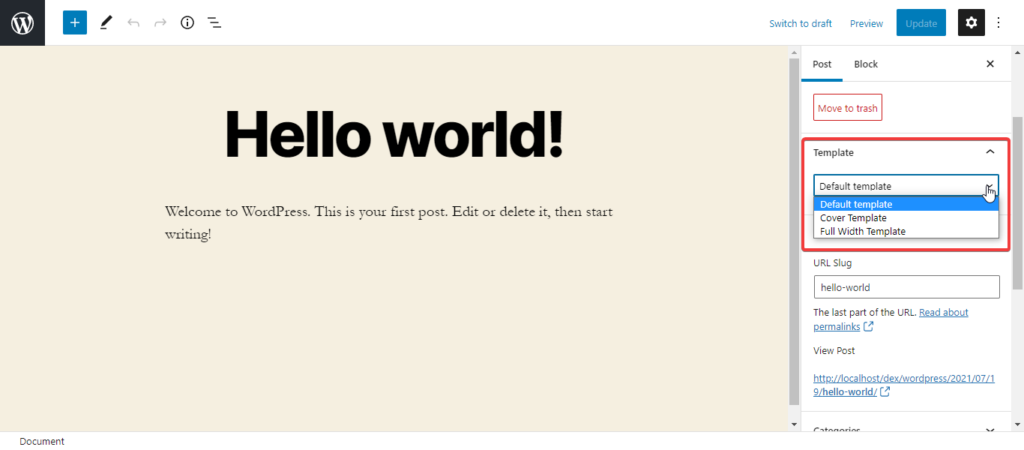
<p><strong>Brand new Template Editor</strong></p>


<p>All new WordPress 5.8 comes with a brand-new template editor. This template editor takes the full website editing to a whole another level. With this new feature, we are moving towards a full site editing tool with the help of a block editor. Therefore, it is only going to get better with future releases.</p>


<figure class="wp-block-image size-large"><img fetchpriority="high" decoding="async" width="1024" height="450" src="https://katsarov.info/wp-content/uploads/2021/07/wordpress-new-template-editor-1024x450.png" alt="WordPress 5.8 Template Settings" class="wp-image-1522" srcset="https://katsarov.info/wp-content/uploads/2021/07/wordpress-new-template-editor-1024x450.png 1024w, https://katsarov.info/wp-content/uploads/2021/07/wordpress-new-template-editor-300x132.png 300w, https://katsarov.info/wp-content/uploads/2021/07/wordpress-new-template-editor-768x337.png 768w, https://katsarov.info/wp-content/uploads/2021/07/wordpress-new-template-editor-600x264.png 600w, https://katsarov.info/wp-content/uploads/2021/07/wordpress-new-template-editor.png 1366w" sizes="(max-width: 1024px) 100vw, 1024px" /></figure>


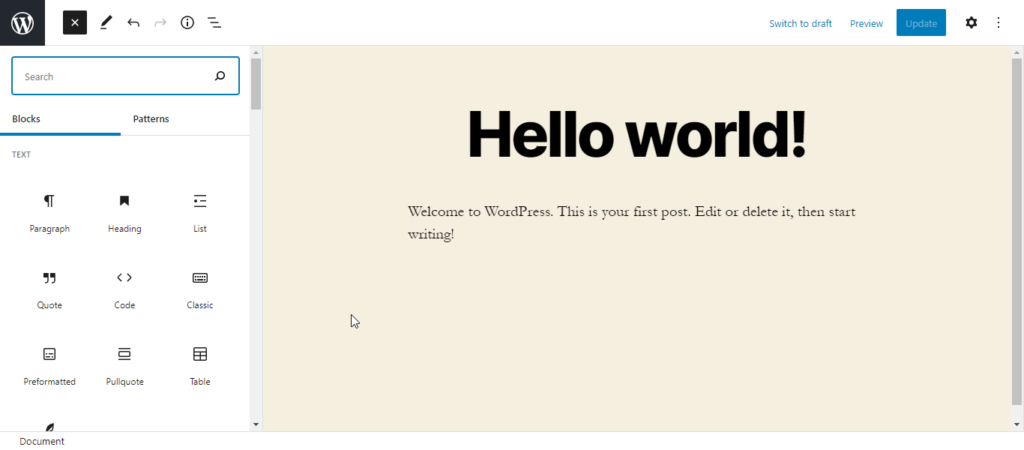
<p>This new template editor allows users to create and save templates of their WordPress sites, and these templates can later be used for posts and pages. The new template editor also introduces the addition of site editing blocks to your templates. These blocks include:</p>


<ul class="wp-block-list"><li>Site Title</li><li>Site Tagline</li><li>Site Logo</li><li>Post Tile</li><li>Post Date</li><li>Post Content</li><li>Query Loop</li><li>Post Tags</li><li>Login and Logout</li><li>Post Featured Image</li></ul>


<figure class="wp-block-image size-large"><img decoding="async" width="1024" height="450" src="https://katsarov.info/wp-content/uploads/2021/07/gutenberg-blocks-1024x450.png" alt="WordPress 5.8 Gutenberg Blocks" class="wp-image-1524" srcset="https://katsarov.info/wp-content/uploads/2021/07/gutenberg-blocks-1024x450.png 1024w, https://katsarov.info/wp-content/uploads/2021/07/gutenberg-blocks-300x132.png 300w, https://katsarov.info/wp-content/uploads/2021/07/gutenberg-blocks-768x337.png 768w, https://katsarov.info/wp-content/uploads/2021/07/gutenberg-blocks-600x264.png 600w, https://katsarov.info/wp-content/uploads/2021/07/gutenberg-blocks.png 1366w" sizes="(max-width: 1024px) 100vw, 1024px" /></figure>


<p>If you are not a fan of this new feature, you will be glad to hear that this new feature is optional and can easily be disabled by theme developers and users. However, the template editor is still dependent on the WordPress theme and carries the same style as your WordPress theme.</p>


<h2 class="wp-block-heading">Blocks can now be used as widgets</h2>


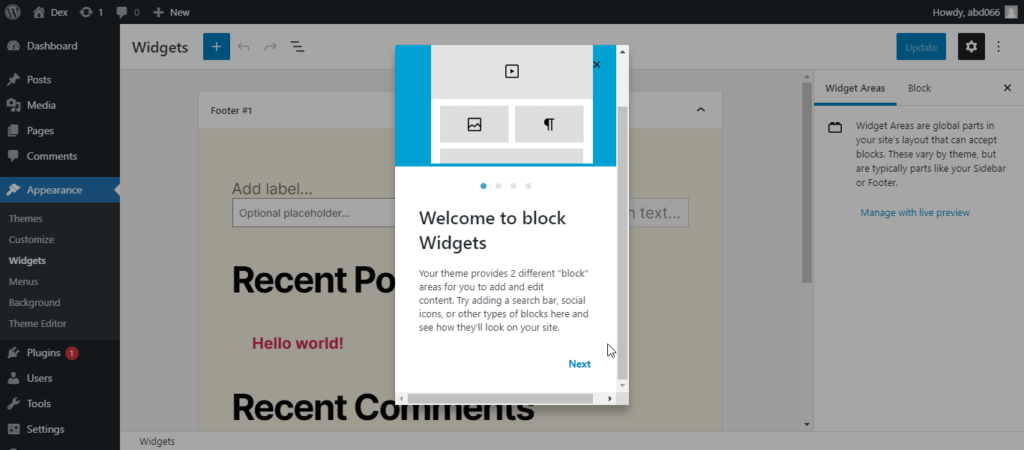
<p>Another big feature coming with the WordPress 5.8 is the use of blocks as widgets. With this, users will now be able to experience the all-new widgets interface by using the Customizer or accessing&nbsp;<strong>Appearance -&gt; Widgets</strong>&nbsp;page.</p>


<figure class="wp-block-image size-large"><img decoding="async" width="1024" height="450" src="https://katsarov.info/wp-content/uploads/2021/07/wordpress-block-widgets-1024x450.png" alt="WordPress 5.8 Block Widgets" class="wp-image-1526" srcset="https://katsarov.info/wp-content/uploads/2021/07/wordpress-block-widgets-1024x450.png 1024w, https://katsarov.info/wp-content/uploads/2021/07/wordpress-block-widgets-300x132.png 300w, https://katsarov.info/wp-content/uploads/2021/07/wordpress-block-widgets-768x337.png 768w, https://katsarov.info/wp-content/uploads/2021/07/wordpress-block-widgets-600x264.png 600w, https://katsarov.info/wp-content/uploads/2021/07/wordpress-block-widgets.png 1366w" sizes="(max-width: 1024px) 100vw, 1024px" /><figcaption>WordPress 5.8 Block Widgets</figcaption></figure>


<p>This blocks as widgets feature bring the flexibility of the block editor to the WordPress sidebar widgets. With this, you can use typography, color, spacing, and other related design tools without the need for any additional plugins.</p>


<p>However, if you are not ready to embrace the change, you can turn off this feature with the help of&nbsp;the<strong> Classic Widgets</strong>&nbsp;plugin until you change your mind.</p>


<h2 class="wp-block-heading">Support for WebP Images</h2>


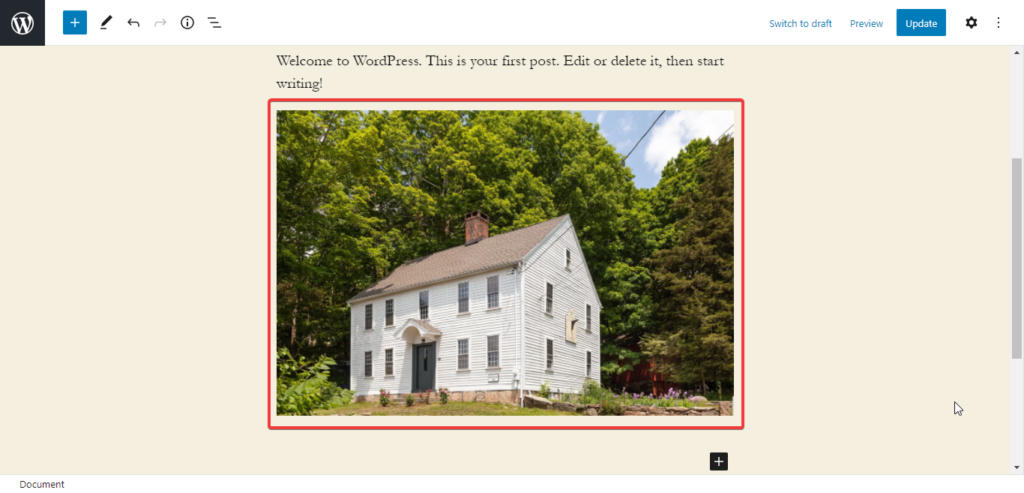
<p>WordPress 5.8 brings support for WebP image format. The Earlier versions don’t support WebP images, and if the user tries to upload a WebP image, he has to face an error.</p>


<p>WebP is a new image format used on the web due to its 25% to 34% smaller size than JPEG and PNG without compromising quality. WordPress 5.8 allows users to upload WebP images to their WordPress websites without using any additional plugins.</p>


<p>However, there is still a small drawback. If users of your website have an unsupported browser, the WebP image will not be automatically replaced by a JPEG or PNG. Therefore, you still might consider using an image compression plugin.</p>


<figure class="wp-block-image size-large"><img loading="lazy" decoding="async" width="1024" height="493" src="https://katsarov.info/wp-content/uploads/2021/07/wordpress-webp-support-1024x493.png" alt="WebP Support in WordPress 5.8" class="wp-image-1528" srcset="https://katsarov.info/wp-content/uploads/2021/07/wordpress-webp-support-1024x493.png 1024w, https://katsarov.info/wp-content/uploads/2021/07/wordpress-webp-support-300x144.png 300w, https://katsarov.info/wp-content/uploads/2021/07/wordpress-webp-support-768x369.png 768w, https://katsarov.info/wp-content/uploads/2021/07/wordpress-webp-support-600x289.png 600w, https://katsarov.info/wp-content/uploads/2021/07/wordpress-webp-support.png 1366w" sizes="auto, (max-width: 1024px) 100vw, 1024px" /><figcaption>WordPress 5.8 Supports WebP Images</figcaption></figure>


<h2 class="wp-block-heading">Editor Improvements</h2>


<p>The block editor is a crucial area where users spend most of their time creating their WordPress sites. Therefore, each new WordPress release tries to fix and improve the block editor.</p>


<p>Here are some editor improvements that are coming with the new WordPress 5.8:</p>


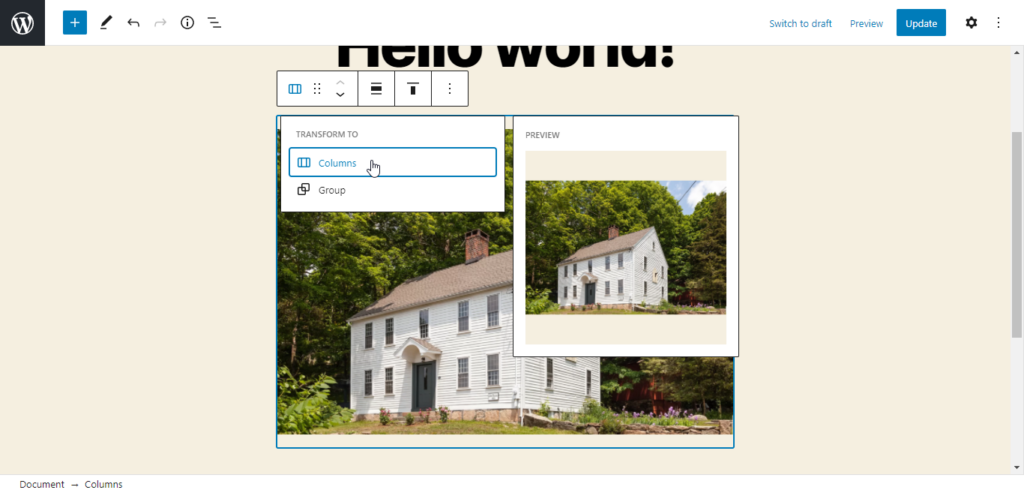
<ul class="wp-block-list"><li>Users now can easily select a parent block in nested blocks.</li></ul>


<figure class="wp-block-image size-large"><img loading="lazy" decoding="async" width="1024" height="493" src="https://katsarov.info/wp-content/uploads/2021/07/gutenberg-editor-transform-1024x493.png" alt="Transform Options in WordPress 5.8" class="wp-image-1529" srcset="https://katsarov.info/wp-content/uploads/2021/07/gutenberg-editor-transform-1024x493.png 1024w, https://katsarov.info/wp-content/uploads/2021/07/gutenberg-editor-transform-300x144.png 300w, https://katsarov.info/wp-content/uploads/2021/07/gutenberg-editor-transform-768x369.png 768w, https://katsarov.info/wp-content/uploads/2021/07/gutenberg-editor-transform-600x289.png 600w, https://katsarov.info/wp-content/uploads/2021/07/gutenberg-editor-transform.png 1366w" sizes="auto, (max-width: 1024px) 100vw, 1024px" /></figure>


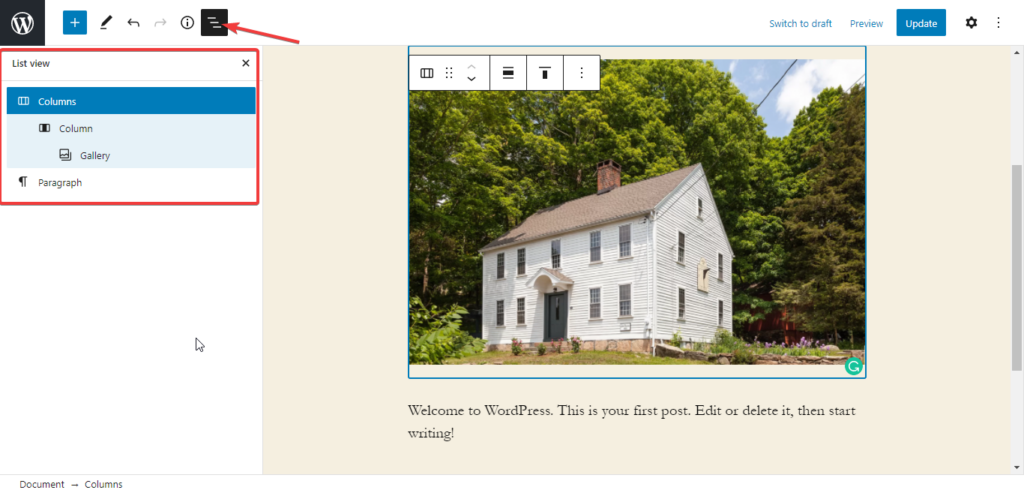
<ul class="wp-block-list"><li>With new WordPress 5.8, users have a new and improved list view panel that shows the complete list of blocks on posts or pages. It is beneficial when trying to move to a specific block in complex layouts.</li></ul>


<figure class="wp-block-image size-large"><img loading="lazy" decoding="async" width="1024" height="493" src="https://katsarov.info/wp-content/uploads/2021/07/gutenberg-list-view-1024x493.png" alt="New List View In Gutenberg Editor" class="wp-image-1530" srcset="https://katsarov.info/wp-content/uploads/2021/07/gutenberg-list-view-1024x493.png 1024w, https://katsarov.info/wp-content/uploads/2021/07/gutenberg-list-view-300x144.png 300w, https://katsarov.info/wp-content/uploads/2021/07/gutenberg-list-view-768x369.png 768w, https://katsarov.info/wp-content/uploads/2021/07/gutenberg-list-view-600x289.png 600w, https://katsarov.info/wp-content/uploads/2021/07/gutenberg-list-view.png 1366w" sizes="auto, (max-width: 1024px) 100vw, 1024px" /><figcaption>New List View In Gutenberg Editor</figcaption></figure>


<ul class="wp-block-list"><li>WordPress 5.8 now features a more improved and optimized block highlighting.</li><li>Introduction of all-new Duotone filters for galleries, images, and cover images.</li><li>More color options for text, background, and link colors, and gradient backgrounds for table block.</li><li>Brand new option to adjust padding among different columns.</li><li>Pattern Suggestions in Add Block Panel</li></ul>


<h2 class="wp-block-heading">Conclusion</h2>


<p>With the release of WordPress 5.8, we have gotten one step closer to Full Site Editing. But the second annual major release has brought much more than the Full Site Editing. There are tons of improvements in the block editor, new Duotone filters, WebP support, and much more.</p>


<p>You can go to the <a href="https://make.wordpress.org/core/5-8/" target="_blank" rel="noreferrer noopener">WordPress 5.8 Development Cycle</a> if you want to learn more about the 5.8 Version or look at the <a href="https://katsarov.info/the-evolution-of-wordpress/">Evolution of WordPress</a> if you are interested in knowing how WordPress evolved over the years.</p>
]]></content>
		
			</entry>
		<entry>
		<author>
			<name>Kristiyan Katsarov</name>
							<uri>https://katsarov.info</uri>
						</author>

		<title type="html"><![CDATA[The evolution of WordPress]]></title>
		<link rel="alternate" type="text/html" href="https://katsarov.info/the-evolution-of-wordpress/" />

		<id>https://katsarov.info/?p=1367</id>
		<updated>2021-06-29T20:33:51Z</updated>
		<published>2021-02-04T14:33:45Z</published>
		<category scheme="https://katsarov.info" term="Uncategorized" />
		<summary type="html"><![CDATA[WIth the help of a graphic designer, I've created an infographic showing the evolution of the most popular content management system at the moment.]]></summary>

					<content type="html" xml:base="https://katsarov.info/the-evolution-of-wordpress/"><![CDATA[
<p>WIth the help of a graphic designer, I've created an infographic showing the evolution of the most popular content management system at the moment.</p>


<img decoding="async" style="max-width: 100%; height: auto;" src="https://katsarov.info/wp-content/uploads/2021/02/wordpress-evolution.png" alt="WordPress Evolution">
]]></content>
		
			</entry>
		<entry>
		<author>
			<name>Kristiyan Katsarov</name>
							<uri>https://katsarov.info</uri>
						</author>

		<title type="html"><![CDATA[4 Reasons Why WordPress Will Take Over The Internet]]></title>
		<link rel="alternate" type="text/html" href="https://katsarov.info/4-reasons-why-wordpress-will-take-over-the-internet/" />

		<id>https://katsarov.info/?p=1328</id>
		<updated>2020-12-21T13:04:25Z</updated>
		<published>2020-12-21T12:42:06Z</published>
		<category scheme="https://katsarov.info" term="Uncategorized" />
		<summary type="html"><![CDATA[If you have read the latest statistics about WordPress and with which technologies websites on the white web are powered, you have already seen that there is a CMS that totally dominates the market - WordPress. Here are some reasons why I think that WordPress will take over the internet in the next decade: 1. [&#8230;]]]></summary>

					<content type="html" xml:base="https://katsarov.info/4-reasons-why-wordpress-will-take-over-the-internet/"><![CDATA[
<p>If you have read the latest statistics about WordPress and with which technologies websites on the white web are powered, you have already seen that there is a CMS that totally dominates the market - WordPress.</p>


<p>Here are some reasons why I think that WordPress will take over the internet in the next decade:</p>


<h2 class="wp-block-heading">1. Big, big community</h2>


<p>One of the big advantages that WordPress has over its competitors is that one of the biggest open-source communities worldwide belongs to WordPress. Even though they do not use git officially, their Slack channel is pretty active, as well the forum and the "mini-communities" of the most supported plugins and themes. For me, WordPress has one of the biggest communities available to open-source lovers out there.</p>


<h2 class="wp-block-heading">2. Active and fast development</h2>


<p>Now this has two meanings, which I want to sum up here - WordPress is being developed rapidly fast because of the large community and big number of contributors, but also allows you to develop websites faster than most of its competitors or alternatives! There are many themes and plugins that extend the functionality of WordPress and make it even more powerful. </p>


<p>But even for developers like me, WordPress is super attractive - I can create REST APIs in zero time, I can create plugins and themes for all the custom functionality I need!</p>


<h2 class="wp-block-heading">3. SEO friendly</h2>


<p>Yes, WordPress is seo friendly. What does this mean? Well the system provides a lot of settings (even without plugins and themes) that help you optimize your website for the search engines. There are many, many plugins that help you optimise your on-page seo even further. Adding microdata, optimizing the article structure, </p>


<p>Did you know that Google knows if your website is using WordPress and checks if your WordPress version is up-to-date? Google is aware that WordPress is market dominator and adds even more support for it.</p>


<h2 class="wp-block-heading">4. Security - always enhanced </h2>


<p>WordPress is known for not being so secure and this is because of the huge market of themes and plugins. People install all kind of themes and plugins which provide all kinds of functionality, but these are not always properly maintained by the authors.</p>


<p>The core itself is secure, actively maintained and patched occasionally. There have been security holes in the core as well, but these always have been patched and maintained on time. Unfortunately I cannot say the same thing about all the themes and plugins. If you buy a theme from markets like Envato, you cannot be sure that the authors will always patch in case of a security breach. The same thing for free plugins on <a href="http://wordpress.org" class="rank-math-link" target="_blank" rel="noopener">wordpress.org</a> - everyone can create and upload his own plugin and theme, but not everyone is able to maintain it properly.</p>


<p>There are some free (and premium) plugins that take care of applying best practices when it comes to improving the security of your website - hiding the login page, applying basic .htaccess rules, correcting file ownership, basic firewall and so on.</p>


<h2 class="wp-block-heading">5. Mature and scalable powerhorse</h2>


<p>WordPress is over 10 years old and I still remember the times when I started using wordpress 3.x for the first time. Over 60% of the white web is powered by WordPress and there are definitely big websites using it that handle thousands of users every minute - for example TechCrunch, Bloomberg and the news center from Microsoft.</p>


<p>Though created as a blog system, WordPress can technically be used for everything. I personally have created all types of websites with it - online shops, learning management systems, REST APIs and so on.</p>


<p><em>Not sure if WordPress suits your needs? <a href="/get-in-touch/" class="rank-math-link">Get in touch</a> with me and let's discuss your ideas!</em></p>


<p></p>
]]></content>
		
			</entry>
		<entry>
		<author>
			<name>Kristiyan Katsarov</name>
							<uri>https://katsarov.info</uri>
						</author>

		<title type="html"><![CDATA[Self-updating Dashboard with Voila and Jupyter Notebook]]></title>
		<link rel="alternate" type="text/html" href="https://katsarov.info/self-updating-dashboard-with-voila-and-jupyter-notebook/" />

		<id>https://katsarov.info/?p=1245</id>
		<updated>2020-11-27T20:16:43Z</updated>
		<published>2019-11-02T18:37:48Z</published>
		<category scheme="https://katsarov.info" term="Jupyter" />
		<summary type="html"><![CDATA[I created an example with self-updating dashboard using voila. Try it on binder now!]]></summary>

					<content type="html" xml:base="https://katsarov.info/self-updating-dashboard-with-voila-and-jupyter-notebook/"><![CDATA[
<h2 class="wp-block-heading">What is a Jupyter Notebook?</h2>


<p>Simply explained, jupyter notebook is an interactive environment where you can run code and view it's output directly in the web. The technology is language-independant, which means it can work with any language, but the most popular one is definitely Python.</p>


<h2 class="wp-block-heading">What is Voila?</h2>


<p>I will post a link to an article describing Voila better than me, but shortly explained, Voila allows you to create dashboards easily from Python Notebooks.</p>


<h2 class="wp-block-heading">The Self-updating Dashboard</h2>


<p>The self-updating dashboard consists of a notebook updating the plot from a separate thread using <code>asyncio</code>. The update is done in a <code>while True</code> loop, but the logic can be easily changed. </p>


<p>The data is gathered from an example api service (which is defined in <code>api.py</code> and started with <code>gunicorn</code>)</p>


<p>You can try it out:</p>


<p><a href="https://github.com/katsar0v/self-updating-dashboard-with-voila" target="_blank" rel="noopener noreferrer">GitHub: katsar0v/self-updating-dashboard-with-voila</a></p>
<p><a href="https://mybinder.org/v2/gh/katsar0v/self-updating-dashboard-with-voila/master?urlpath=voila%2Frender%2Fdashboard.ipynb" target="_blank" rel="noopener noreferrer"><img decoding="async" src="https://camo.githubusercontent.com/483bae47a175c24dfbfc57390edd8b6982ac5fb3/68747470733a2f2f6d7962696e6465722e6f72672f62616467655f6c6f676f2e737667" alt="68747470733a2f2f6d7962696e6465722e6f72672f62616467655f6c6f676f2e737667"></a></p>


<p><em>If you want to learn more about Voila, you may want to read </em><a href="https://blog.jupyter.org/and-voil%C3%A0-f6a2c08a4a93" target="_blank" rel="noopener"><em>this article</em></a><em>.</em></p>


<p><a href="https://github.com/voila-dashboards/voila" target="_blank" rel="noopener"><em>Voila GitHub repository.</em></a></p>
]]></content>
		
					<link rel="replies" type="text/html" href="https://katsarov.info/self-updating-dashboard-with-voila-and-jupyter-notebook/#comments" thr:count="0" />
			<link rel="replies" type="application/atom+xml" href="https://katsarov.info/self-updating-dashboard-with-voila-and-jupyter-notebook/feed/atom/" thr:count="0" />
			<thr:total>0</thr:total>
			</entry>
		<entry>
		<author>
			<name>Kristiyan Katsarov</name>
							<uri>https://katsarov.info</uri>
						</author>

		<title type="html"><![CDATA[Big Data – is it overhyped?]]></title>
		<link rel="alternate" type="text/html" href="https://katsarov.info/big-data-is-it-overhyped/" />

		<id>https://katsarov.info/?p=1185</id>
		<updated>2020-11-27T20:17:13Z</updated>
		<published>2019-10-27T08:25:15Z</published>
		<category scheme="https://katsarov.info" term="Data Science" />
		<summary type="html"><![CDATA[Is big data an overhyped term? Here are my thoughts on this topic.]]></summary>

					<content type="html" xml:base="https://katsarov.info/big-data-is-it-overhyped/"><![CDATA[
<p>Big Data is a term that is gaining popularity in the business sector these days. It is the collection of large volumes of structured and unstructured data, extracted from multiple sources. Such data are diverse in nature and are based on real-time analytics. Big Data is a field that deals with ways of analyzing – semantically retrieving information or otherwise handling arrays of data that are too large or complex to handle by traditional data processing software. Data that provides multiple information on a single metric (rows) offers better statistical accuracy. While data with higher complexity (more metrics/attributes or columns) can lead to wrong end results. Big Data has found application in a number of beneficial ways. But the field has some issues that obstruct smooth implementation. Some experts say that the only way of overcoming these defects is by changing its functioning in the long run.</p>


<p>When
we’re talking about big data, it turns out that the term describes
everything related to data. That way, depending on who you ask, large
datasets can be technical infrastructure, unstructured data (without
SQL databases), or combining data from more than two sources. So,
until standard definition emerges, big data means…nothing. 
</p>


<p>Even
though it’s been talked about large data sets for a long time, the
acceptance rate has not yet reached a critical mass. People need to
understand the experience of owning data, because although everyone
in our society produces huge amounts of data, individuals rarely see
or interact with it. When the tools for storing, visualizing and
exploring data are available, there will be an understanding of the
value and usefulness of this information. This better understanding
of Big Data can lead to better ways of solving important problems,
such as responding to disasters, diagnosing cancer quickly and
accurately, or analyzing the spread of disease. 
</p>


<p><em>Here
are some reasons, for which Big Data is being criticized as
overhyped:</em></p>


<ul class="wp-block-list"><li>
Lack
	of standard model – While Data Scientists can create observations
	on the basis of results, generated by this technology, one needs an
	entire operating model to apply and put to use the collected data
	and the analytics in a repeatable manner. A possible solution could
	be to embed AI (Artificial Intelligence) with Big Data Analytics, in
	its application. Another way, in which Big Data Analytics could be
	implemented effectively, is applying experience and knowledge into
	insights. 
	
	</li><li>
Another
	reason why Big Data is being overhyped could be the claim that by
	harvesting more data will be created more value. This is absolutely
	not true. Data with significant amount of history is always more
	beneficial than large, freshly-acquired data sets. Less data with
	more history will prove beneficial, instead of mining more data,
	which can ultimately prove useless in its application to produce
	desired results. 
	
	</li><li>
It
	is a great thing that a merchant can optimize his work with 270
	million records from 30 hours for processing to only 2 hours. Time
	saving is important, but what is expected to happen, is to enable
	the company to analyze different scenarios with these records. Only
	then will Big Data be relevant to this merchant. 
	
</li></ul>


<p>Despite tis pitfalls, Big Data is a technology that has found implementation in various sectors and one that will witness solid, predictable growth in the years to come. It has not only changed the way the technical world functions, but laid its stamp on the fundamental functioning of businesses. There are concerns that Big Data technology could replace the human factor and therefore may not require certain job positions. This is unjustified as experts interpret the available data and ask the right questions that the system needs to answer. In fact, the system helps to make better informed and personalized decisions for the next best step in the process.   </p>
]]></content>
		
					<link rel="replies" type="text/html" href="https://katsarov.info/big-data-is-it-overhyped/#comments" thr:count="0" />
			<link rel="replies" type="application/atom+xml" href="https://katsarov.info/big-data-is-it-overhyped/feed/atom/" thr:count="0" />
			<thr:total>0</thr:total>
			</entry>
		<entry>
		<author>
			<name>Kristiyan Katsarov</name>
							<uri>https://katsarov.info</uri>
						</author>

		<title type="html"><![CDATA[25+ Facts about WordPress that will amaze you]]></title>
		<link rel="alternate" type="text/html" href="https://katsarov.info/25-facts-about-wordpress-that-will-amaze-you/" />

		<id>https://katsarov.info/?p=1182</id>
		<updated>2020-11-27T20:17:22Z</updated>
		<published>2019-10-26T08:24:02Z</published>
		<category scheme="https://katsarov.info" term="Wordpress" />
		<summary type="html"><![CDATA[I present you over 25 facts that show how amazing WordPress is.]]></summary>

					<content type="html" xml:base="https://katsarov.info/25-facts-about-wordpress-that-will-amaze-you/"><![CDATA[
<p>At some point of your life, you’ve probably wanted to have your own blog, online store, or a simple web page, or you were at least interested in the ways of doing it most easily. WordPress is a name you came across at least once in your life, even if you don’t know anything about programming at all. Recently, WordPress’s popularity as a CMS system and website creation technology has grown enormously. An idea of the scale of platform development, we can derive from the following 25+ statistical facts about WordPress:  </p>


<ol class="wp-block-list"><li>
Wordpress’s
	repository offers nearly 44,000 plugins, downloaded over 1.22
	million times. 
	
	</li><li>
Wordpress
	supports 160 languages and 40 international translations.
	</li><li>
You
	have nearly 3000 themes available, which have been downloaded 118
	million times. 
	
	</li><li>
Wordpress
	is older than Facebook and Twitter. The first version of WordPress
	was released on May 27, 2003. 
	
	</li><li>
Today,
	Wordpress is one of the most popular platforms that feeds 27% of all
	websites worldwide. In the field of CMS (Content Management
	Software) WordPress has a 76.4% market share.
	</li><li>
Wordpress
	is free. It is licensed under the GNU GPL, which allows anyone in
	the world to download and use WordPress. The WordPress source code
	is open and accessible to anyone who wants to learn, use, or modify
	it. 
	
	</li><li>
83%
	of hacked sites have not been updated. 
	
	</li><li>
30,000
	websites are hacked every day. 
	
	</li><li>
Averagely,
	every 5 seconds, a WordPress site is being attacked. 
	
	</li><li>
Wordpress
	is most popular among Business sites. 
	
	</li><li>
71%
	of WordPress blogs are written in English. 
	
	</li><li>
Wordpress
	is least popular among news sites. 
	
	</li><li>
Wordpress
	doesn’t generate revenue as a trademark. To protect the freedoms
	that come from open source of WordPress, its creator Mat Mullenweg
	also founded the WordPress Foundation. The foundation is a
	non-profit company that owns the rights to the WordPress brand and
	uses them to guarantee its freedom, its free distribution and its
	open source and accessible code, without benefiting from it. 
	
	</li><li>
About
	17 new posts are published on the platform every second. By doing
	so, it only counts the sites hosted through WordPress, not those
	that are used individually, which means that most of them go
	unnoticed by the company. 
	
	</li><li>
Wordpress
	sites receive 22.17 billion monthly views. 
	
	</li><li>
The
	official forum of the system contains over 2 million topics written
	by nearly 300,000 active users.
	</li><li>
$50/hour
	is the average cost of WordPress developers. It takes an average
	150-200 hours for beginners to build a new site. 
	
	</li><li>
40%
	of visitors abandon a website that takes more than 3 seconds to
	load.
	</li><li>
Celebrities,
	such as Sylvester Stallone, Jay Z, Kobe Bryant, also use WordPress. 
	
	</li><li>
Monthly
	meetups are being organized by hundreds of thousands of WordPress
	users in nearly 440 cities around the world. 
	
	</li><li>
One
	of the most purchased WordPress themes of all times with more than
	450,000 customers is Avada. 
	
	</li><li>
About
	8% of WordPress sites were hacked due to a weak password. 
	
	</li><li>
Individuals
	can make money out of WordPress, working as a: WordPress content
	writer, website designer, SEO freelancer, theme/plugin developer,
	etc. 
	
	</li><li>
A
	simple search on Google about “Wordpress jobs” turns up nearly
	1,250,000 results. 
	
	</li><li>
Google
	Analytics is used by nearly 84% of WordPress sites. 
	
	</li><li>
It
	is the most user-friendly platform, which makes it fun and easy to
	use because it takes not more than 5 minutes to create a simple
	website. 
	
	</li><li>
The
	company responsible for WordPress – Automattic, employs only 830
	people. 
	
	</li><li>
Wordpress
	is expected to power more than 35% of the web by the end of the
	decade. 
	
</li></ol>


<p>You can’t argue with real data and statistics. Fast, free, and customized for every need, WordPress remains the best site-building system. With a good marketing plan and the use of optimization plugins, you are able to generate high search engine traffic and rankings.  </p>
]]></content>
		
					<link rel="replies" type="text/html" href="https://katsarov.info/25-facts-about-wordpress-that-will-amaze-you/#comments" thr:count="0" />
			<link rel="replies" type="application/atom+xml" href="https://katsarov.info/25-facts-about-wordpress-that-will-amaze-you/feed/atom/" thr:count="0" />
			<thr:total>0</thr:total>
			</entry>
	</feed>